
AI Pet Portrait Generator Workflow for Keepsake Pins
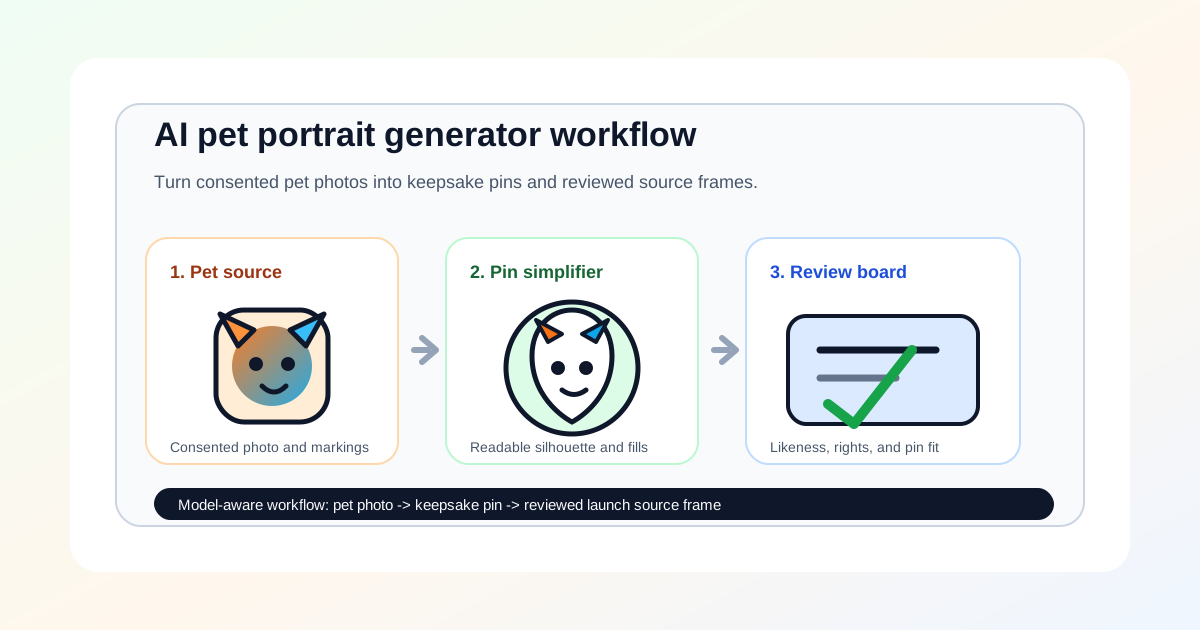
AI pet portrait generator searches point to a narrow but useful AI Pin Maker workflow: turn a pet photo into an original keepsake pin concept, then decide whether that design can become a badge, backing card visual, product still, or short reveal source frame. The job is not to replace a real artist or to claim a generated image is production-ready. It is to create a reviewed concept that respects the pet's identity while simplifying the image for a physical object.
That mix is a good match for AI Pin Maker because the user usually starts with a personal photo, then needs a practical output: a memorial pin, adoption fundraiser badge, pet club giveaway, or small merch concept that can be reviewed before spending credits.
Start from a consented pet photo
Begin with a permissioned photo
An AI pet portrait generator brief should start with a photo the creator has permission to use. The prompt can name the pet type, expression, fur markings, collar color, pose, and emotional tone, but it should avoid copying another artist's pet portrait style or a protected character costume.
Run AI Pin Maker when the result should become a keepsake pin or badge. Use text to image when the creator wants a first-pass portrait direction from written notes. Use image to video only after the still portrait is stable enough to preserve through motion.
The strongest brief is physical from the start: one pet, clear silhouette, thick outline, limited color fills, simple background, and optional backing-card space. That keeps the portrait generator from making a decorative image that cannot survive enamel pin constraints.
Use creator signals as a quality warning
Creator discussion shows both demand and skepticism around AI pet portraits. `ghekiere41796` posted about building Maison Zola, described as an AI pet portrait studio that turns a few dog photos into gallery-quality artwork.
The same search also surfaced a useful counter-signal. artist `courtneysgotart` posted "Ai doesn't come close to this" while promoting hand-made pet portrait commissions.
AI Pin Maker should treat those posts as workflow evidence, not source material. Do not reuse third-party images or competitor videos. The lesson is that pet keepsakes are emotional products, so the AI stage must preserve recognizable markings, avoid uncanny anatomy, and leave room for manual review.
Simplify the portrait into a pin
Reduce photo detail to readable shapes
Pet photos often contain detail that looks charming in a full image but fails on a small pin. Fur texture, whiskers, eye reflections, collar tags, shadows, and background objects need to be reduced into readable shapes. The goal is a recognizably similar pet, not a literal photo trace.
Review the concept at thumbnail size. The head shape should read first, the eye placement should stay natural, the main fur patches should be large enough to fill, and any name text should be moved to the backing card if it becomes too small. A rounded portrait pin, a head-and-shoulders mascot pin, or a simple paw-and-face badge will usually work better than a busy full-body scene.
If the AI pet portrait generator invents extra collars, changes markings, merges pets, or adds brand logos, reject the frame. A keepsake pin needs consistency and trust more than visual novelty.
Route models by keepsake stage
Route by keepsake stage
Still-image routes fit the first pass. GPT Image 2, Gemini image routes, ByteDance Doubao or Seedream image models, and Alibaba Wan image routes can create portrait directions, pin-ready simplifications, and backing-card concepts. The useful prompt asks for an original keepsake pin style, clean border, simplified fur shapes, and no copied artist style.
Video routes come later. Seedance, Wan, HappyHorse, Kling, and Veo can animate an approved still frame for a reveal clip, memorial montage, or fundraiser teaser, but motion should not be used until the still frame preserves the pet's markings and pin silhouette.
Safety boundaries remain simple for this topic. Public pet keepsake content should stay brand-safe, consented, and non-exploitative, with the chosen still and video routes treated as concept tools rather than final production output.
A worked example from prompt to pin
Picture an owner making a memorial keepsake for a tabby cat named Biscuit. They start in text to image with a permissioned photo and a prompt like "head-and-shoulders portrait of an orange tabby cat, large round green eyes, distinct M-stripe forehead marking, soft cream chest, thick clean outline, flat color fills, plain pale background, no name text."
Three concepts come back; the one that keeps the M-stripe and eye spacing closest to the real photo wins, because likeness is the whole point of a keepsake. The design then routes into AI Pin Maker, where the fur is collapsed from a dozen tonal patches into four enamel fills, the whisker lines are dropped entirely, and the name "Biscuit" is moved off the face onto the backing card so it does not shrink into noise at 1.5-inch diameter.
The adjustment pass widens the ear borders so the metal lines hold, and the output spec is a rounded keepsake pin concept plus a backing-card layout with the name and dates kept as editable text the family can proof before ordering. ## Convert portrait interest into AI Pin Maker action
The conversion path is practical: upload or describe the pet, generate a few portrait concepts, simplify the best one into a pin-ready shape, review likeness and originality, then decide whether the frame should become a pin concept, backing card, product photo, or video source.
Run AI Pin Maker to make the keepsake pin direction, text to image to explore portrait styles, and image to video only after the still concept is approved.
Routes `AI pet portrait generator` demand into a model-aware AI Pin Maker workflow: preserve the pet's identity, simplify the portrait for a physical pin, keep rights and safety boundaries accurate, and move toward paid output only when the concept can support a real keepsake decision.
Explore more AI Pin Maker tools