
AI Infographic Generator for Explainer Cards
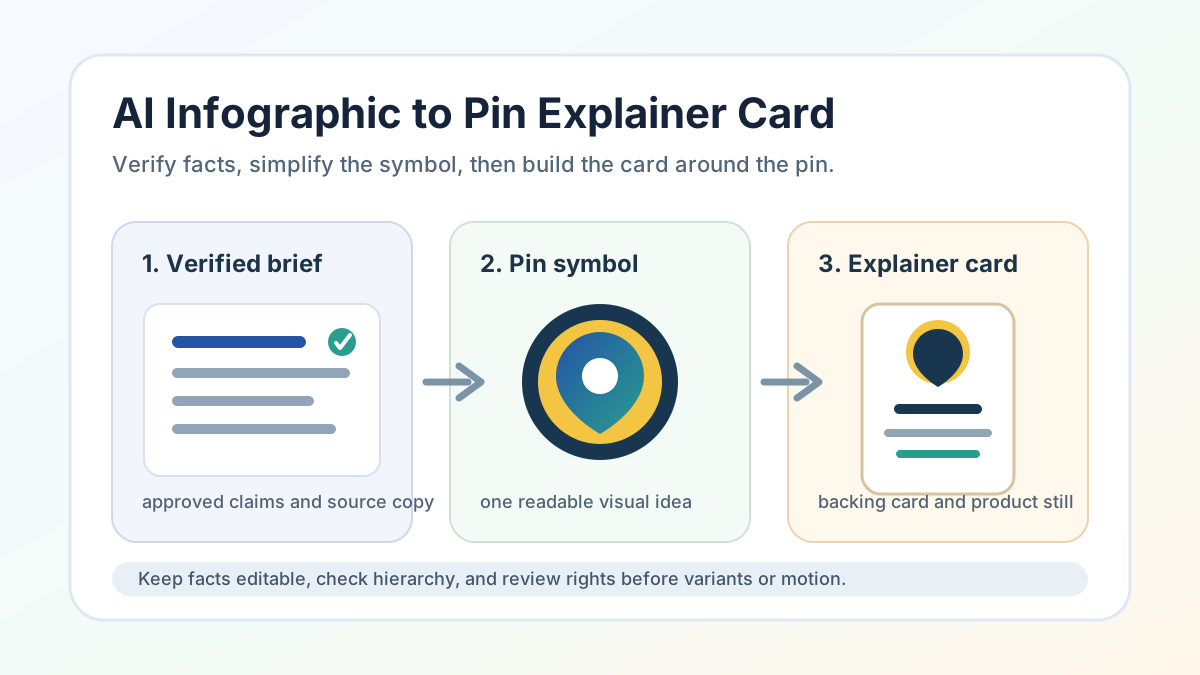
AI infographic generator searches are about turning information into visual structure. For AI Pin Maker, the useful version is narrower: convert a complex idea into a pin explainer card, backing card, product still, launch graphic, or reviewed source frame that supports a badge or enamel pin.
Creator discussion shows why the workflow needs review. People are testing AI-made infographics, launching dedicated infographic tools, sharing brand infographics, and criticizing weak or misleading AI infographic output. AI Pin Maker should not copy any public infographic, claim data authority, or generate final factual reports. It can help users structure visual explanation around an original pin concept.
Start with verified information
An AI infographic generator prompt should not invent the facts. Start with a short verified brief: what the pin represents, what the audience needs to understand, which claims are approved, and which details must stay editable outside the image.
Pick AI Pin Maker when the final object is a badge or enamel pin. Use text to image for infographic-style backing cards, explainer cards, product stills, and launch frames. Use image to video only after the still explainer is reviewed.
The safest brief has three layers: one pin-ready symbol, one short explanatory headline, and three to five supporting points. Long tables, legal claims, medical claims, financial claims, and tiny text should stay outside the generated image until reviewed by the right person.
Use creator signals as a caution signal
public discussion around AI infographics includes both product-building enthusiasm and skepticism about low-quality or misleading visuals. That is a useful signal for AI Pin Maker because pin packaging also depends on trust. A beautiful card can still fail if the hierarchy is confusing or the facts are not checked.
Do not reuse third-party images, brand examples, client-test framing, tool-launch wording, political claims, chart layouts, PDF screenshots, or critique language. Treat the evidence as a review requirement: an AI-generated explainer card needs fact checks, readable hierarchy, and original visual structure.
For a pin workflow, the question is smaller than a full report. Does the card explain the pin's meaning, collection role, event context, or product story without overloading the buyer? If not, simplify before generating more variants.
Turn the infographic into pin packaging
Reduce the layout to one hook
Infographic layouts usually carry too much information for a small product asset. A pin backing card should reduce the idea into one visual hook, one title, and a few short labels. The pin face should stay independent from the card.
Extract the pin symbol from the data
Start with the main concept. Extract one symbol for the pin. Build an explainer card around that symbol. Add a product still that shows the pin and the card together. If the card needs charts, timelines, or process steps, keep them simple and editable.
Reject outputs with fake statistics, unreadable microtype, copied brand diagrams, misleading certification marks, or unsupported claims. AI Pin Maker can produce visual directions and source frames, but it does not validate research, citations, legal copy, scientific claims, or final production files.
Route models by visual stage
Still-image routes fit the first infographic stage. GPT Image 2, Gemini image routes, ByteDance Doubao or Seedream image models, and Alibaba Wan image routes can create explainer-card directions, backing-card frames, product stills, and pin-package mockups.
Video routes should wait for an approved still. Seedance, Wan, HappyHorse, Kling, and Veo can turn a reviewed explainer card into a launch teaser or product reveal, but motion should not hide bad data, copied diagrams, or unreadable text.
Public infographic-style pin assets should stay factual, original, age-safe, and rights-aware regardless of which model route is selected.
What usually goes wrong
Infographic-style pin packaging fails most often on facts the model invents to fill space. The first trap is the fabricated statistic: asked for an explainer card, the model cheerfully adds a percentage or a trend arrow that no one verified, and a buyer who reads it as real loses trust when it turns out to be decoration. Keep every number in an approved brief and treat generated figures as placeholders to replace.
The second is microtype overload, where a tidy-looking card crams five labels and a legend into space that becomes unreadable on a 70x90mm backing card; cut to one headline and three short labels sized for print, not for the screen mock. The third is the borrowed-chart trap, where the model reproduces a chart style or icon set that echoes a known brand's diagram, making original packaging look derivative; rebuild the layout with your own visual structure.
A quieter fourth issue is the fake certification mark or seal that implies authority the product does not have; remove anything that looks official. Catch these at the still-card stage, because a confident infographic that misleads is worse for a small seller than a plainer card that is simply true.
Convert infographic demand into AI Pin Maker action
The workflow is practical: verify the information, define one pin-ready symbol, create an explainer card, review facts and readability, then move into paid variants or motion only after the still asset works.
Pick AI Pin Maker for the badge concept, text to image for explainer cards and product stills, and image to video after the still card passes review.
Shapes `AI infographic generator` intent into a model-aware AI Pin Maker workflow: keep facts verified, make the pin symbol readable, separate editable copy from generated art, and use the infographic frame to support the product rather than overwhelm it.
Explore more AI Pin Maker tools